

When your team spans New York, London, and Singapore, there is no single quiet hour to push updates. Someone is always working, and a clumsy patch rollout can interrupt all of them.
Remote and hybrid work is now the norm rather than the exception, which means software lives on devices scattered across the globe.
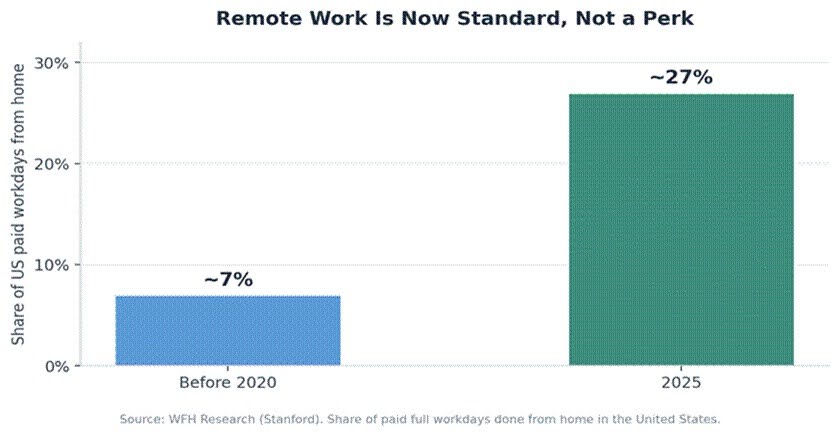
That sprawl makes patching both harder and more important. Choosing the right patch management solution for digital teams is what keeps a distributed workforce both productive and protected.
Here are six features that matter most when your people, and their machines, never all sleep at once.
The goal is simple: keep every device current and secure without ever interrupting someone mid-task, no matter which hemisphere they are working from.
Why Patching Distributed Teams Is Hard
A traditional office could patch overnight when everyone had gone home. A global team has no shared night, so updates must be smarter about when and how they land.
The stakes are high. Exploited software flaws reached 20 percent of breaches in 2025, a 34 percent jump in a single year, nearly matching stolen passwords as the top way in.
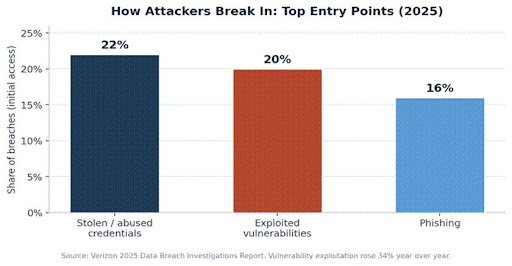
Most of those flaws already had a fix available. The challenge is delivering that fix to every device, in every region, without disrupting work or leaving gaps.
Who Needs This Most
Any organization with people in more than one time zone feels this pressure, but a few groups feel it acutely.
Distributed IT teams and managed service providers juggle fleets of machines they can never physically reach, so remote, automated patching is essential.
Software and product teams run servers and developer machines that must stay current without halting active work in another region.
Lean startups and small businesses, often without a dedicated security team, need automation to do the heavy lifting that a larger IT department otherwise would.
The Six Features That Matter Most in a Patch Management Solution
The table below summarizes what to look for, and why each feature earns its place for a team working across time zones.
| Feature | Why it matters for cross-time-zone teams |
| Automated deployment | Patches roll out without manual effort in every region |
| Time-zone-aware scheduling | Updates land during each user’s off-hours, not their workday |
| Remote, unattended access | Reaches devices anywhere, with no one on the other end |
| Risk-based prioritization | Fixes actively exploited flaws first |
| Centralized visibility | One dashboard shows patch status across all locations |
| Testing and rollback | Staged rollouts catch bad patches before they spread |
1. Automated, Policy-Driven Deployment
Manual patching does not scale across regions and devices. Look for a tool that applies updates automatically based on rules you set once.
Good automation handles the routine work quietly, so a small team can keep hundreds of machines current without chasing each one by hand.
The best tools also let you group devices, so a policy can target, say, all developer laptops or all regional servers at once. A modern patch management solution should make this process seamless across geographically distributed environments.
2. Time-Zone-Aware Scheduling
This is the feature distributed teams most often overlook. The solution should let you schedule updates around each region’s working hours.
A patch that reboots a laptop at 3 p.m. in Singapore is a problem, even if it is the middle of the night in your own office. Flexible maintenance windows solve that.
3. Remote and Unattended Access
Your devices are not on a single office network, so the tool must reach them wherever they are, even when no one is signed in.
Unattended deployment means a server in one country or a laptop in another gets patched on schedule, without waiting for a person to click anything. This is also where good support for the right digital workplace tools pays off across a dispersed workforce.
4. Risk-Based Prioritization
No team can patch everything at once, so the tool should help you fix the most dangerous flaws first, guided by severity and real-world exploitation.
Public resources such as the list of flaws under active attack make this practical, and a strong patch management solution mirrors how vulnerabilities are scored and prioritized so the urgent items rise to the top automatically.
5. Centralized Visibility and Reporting
You cannot manage what you cannot see. A single dashboard should show, at a glance, which devices are patched, which are pending, and which are at risk.
For a manager coordinating across regions, that shared view replaces a tangle of status emails with one reliable picture of the whole fleet.
Clear reporting also supports audits and standards, and it gives a distributed team a shared source of truth no matter where each member sits. The same discipline applies to protecting business data across every location.
6. Testing, Staged Rollout, and Rollback
A bad patch can break a critical app, and across time zones that damage spreads before anyone notices. Staged rollouts limit the blast radius.
Deploy first to a small test group, confirm nothing breaks, then expand. If a patch misbehaves, automatic rollback restores the previous state fast.
This staged approach is doubly valuable for distributed teams, since a problem caught in the test ring never reaches colleagues who are asleep and unable to react. Any enterprise-grade patch management solution should include these safeguards by default.
How These Features Work Together
On their own, each feature helps. Together, they turn patching from a recurring scramble into a quiet, reliable background process.
Automation and scheduling handle the routine. Prioritization and visibility focus attention where it matters. Testing and rollback provide the safety net.
For a team that never fully clocks off, that combination is what keeps machines current without anyone losing a working hour to an ill-timed update.
It also frees the people running the program. Instead of manually nursing each region’s devices, they set the policies once and step in only when the dashboard flags something that needs a human decision.
The Cost of Getting It Wrong
Skipping these features is not a neutral choice. Unpatched systems are among the most exploited paths into an organization, and the bill can be steep.
The global average cost of a data breach reached about 4.4 million dollars in 2025, and recovery is far harder when a team is scattered across continents.
Speed matters too. Attackers often begin exploiting a known flaw within days, while many organizations still take weeks to patch internet-facing systems.
That gap is where distributed teams are most exposed, because a device sitting idle overnight in one region is still reachable by an attacker who never sleeps.
Frequently Asked Questions
Why is patching harder for distributed teams?
There is no shared downtime. With people working around the clock in different regions, updates must be scheduled per location to avoid interrupting anyone’s workday.
What is the single most important feature?
For a global team, time-zone-aware scheduling combined with automation. Together they keep devices current without disrupting work anywhere.
Do we still need testing if patches are automated?
Yes. Staged rollouts and rollbacks catch the occasional bad patch before it reaches every device, which matters even more when a team is dispersed.
How fast should critical patches be applied?
As soon as practical. Attackers can weaponize a known flaw within just days, so a long delay widens the window of exposure considerably.
Can a small team manage this without a large IT department?
Yes. Automation and centralized dashboards are designed precisely so a lean team can keep many devices patched across regions.
What about employees’ personal devices?
Many solutions extend to the laptops and phones that connect to company systems. Covering those endpoints closes a gap that distributed teams often miss.
The Bottom Line
For teams working across time zones, patch management is not just a security task. It is part of keeping a global operation running smoothly.
Prioritize automation, time-zone-aware scheduling, remote access, smart prioritization, central visibility, and safe rollouts. Those six features handle the everyday realities of a workforce that never all sleeps at once.
Get them right, and updates become invisible: always current, never disruptive, wherever your people happen to be working. That quiet reliability is exactly what a global team needs from a patch management solution.